Work Flow APP — Open Source Team Productivity Suite
Work Flow
Free Team Time Tracking & Collaboration Platform
Stop paying for Jira, Clockify, and Monday.com. Work Flow gives your team time tracking, real-time chat, task boards, file sharing, and reporting — completely free, forever. Open source. No subscriptions. No limits.
✅ Active & Ready to UseKey Features
Everything your startup needs to stay productive — built into one lightweight desktop app.
⏱ Time Tracking
Start/stop timer with project categories. Auto-stop safety after 10 hours. Real-time sync across the team via Firebase.
👥 Team Status
See who is Online, Working, or Offline in real time. Heartbeat updates every 60 seconds. Sound alerts for status changes.
💬 Team Chat
Built-in group chat with sound notifications. No Slack needed. Messages sync in real time through Firebase.
📋 Sticker Board
Kanban-style task board with priorities (High/Medium/Low), types (Todo/Bug/Idea/Reminder), and assignment to team members.
📁 File Sharing
Drag-and-drop file sharing up to 5 MB. Password-protected downloads. No third-party storage needed.
📖 Wiki / Knowledge Base
Shared team knowledge base with categories. Admins can add, edit, and organise. Color-coded notes for quick reference.
🍅 Pomodoro Timer
Built-in 25/5/15 Pomodoro technique timer with visual progress ring. Works independently alongside time tracking.
📊 Reports & Export
PDF monthly reports, CSV export, printable summaries. Breakdown by project, by date, with total hours calculated automatically.
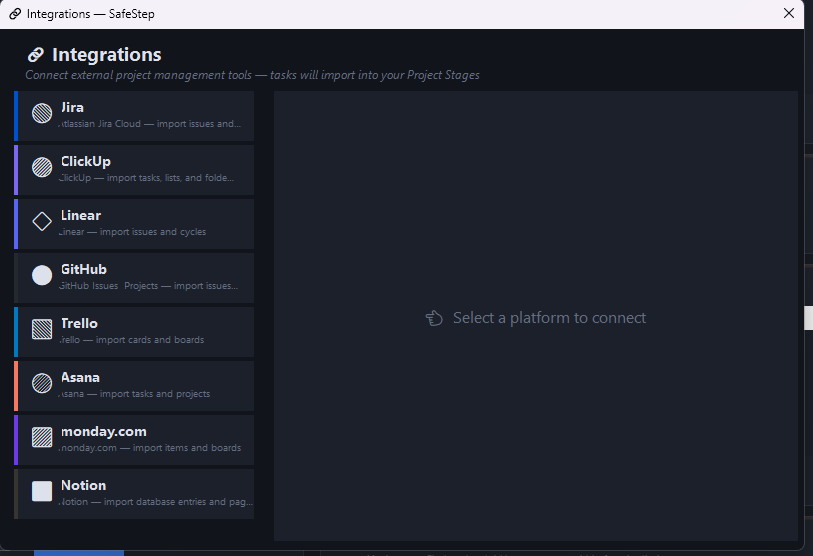
🔗 Multi-Platform Integrations
Connect Jira, ClickUp, Linear, GitHub, Trello, Asana, monday.com, and Notion. Import tasks directly into Work Flow.
📝 Standup Generator
Auto-generate daily standup summaries from your tracked work. Yesterday’s tasks, today’s plan — ready to paste into any meeting or chat.
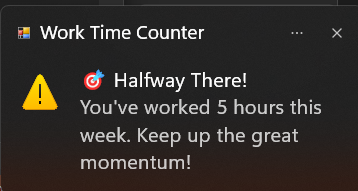
⚠️ Popup Notifications
Motivational milestone popups celebrate your progress. Get notified when you hit work-hour goals to keep the momentum going.
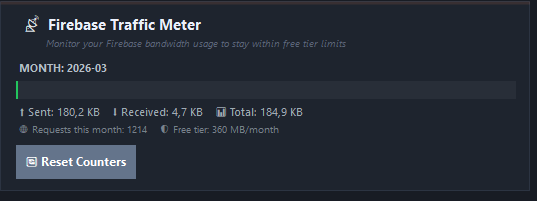
📊 Firebase Traffic Meter
Monitor your Firebase bandwidth usage in real time. Track sent, received, and total data to stay within free-tier limits.
🆕 New Feature: Smart Popup Notifications
Stay motivated with milestone popups that celebrate your work progress. Work Flow now tracks your weekly hours and sends friendly reminders to keep you going.
Desktop + Mobile. One Team. Always in Sync.
Work Flow is no longer just a desktop app. Take your team’s productivity with you — track time, chat with your team, and manage tasks from anywhere with the new Work Flow Mobile App.
Track Time On the Go
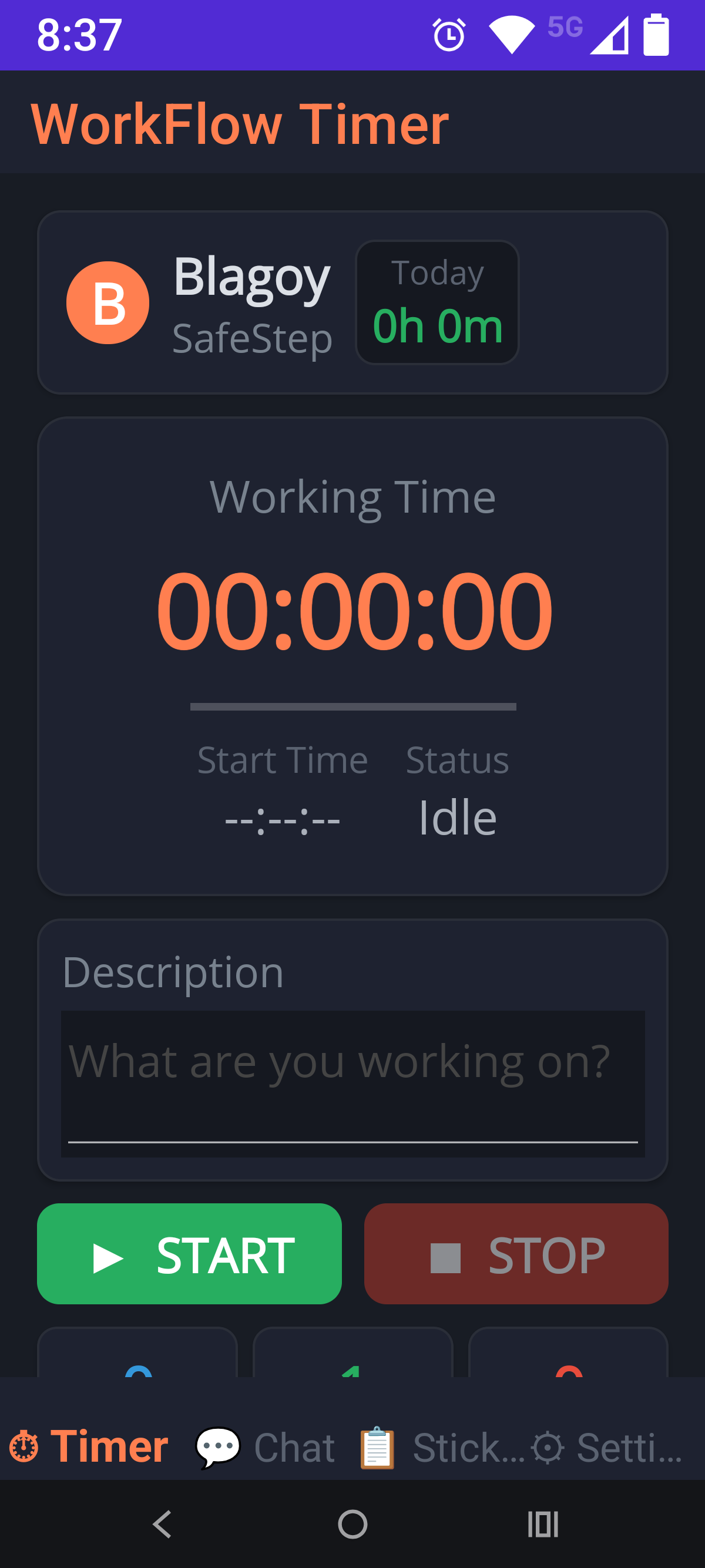
Whether you’re commuting, in a meeting, or working from a coffee shop — start and stop your work timer directly from your phone. Your team sees your status update in real time, just like on the desktop app.
- One-tap START / STOP — begin tracking instantly from your phone
- Live team status — see who is working, idle, or offline right now
- Work descriptions — add notes about what you’re working on
- Real-time Firebase sync — your hours appear on desktop immediately
Your App, Your Way
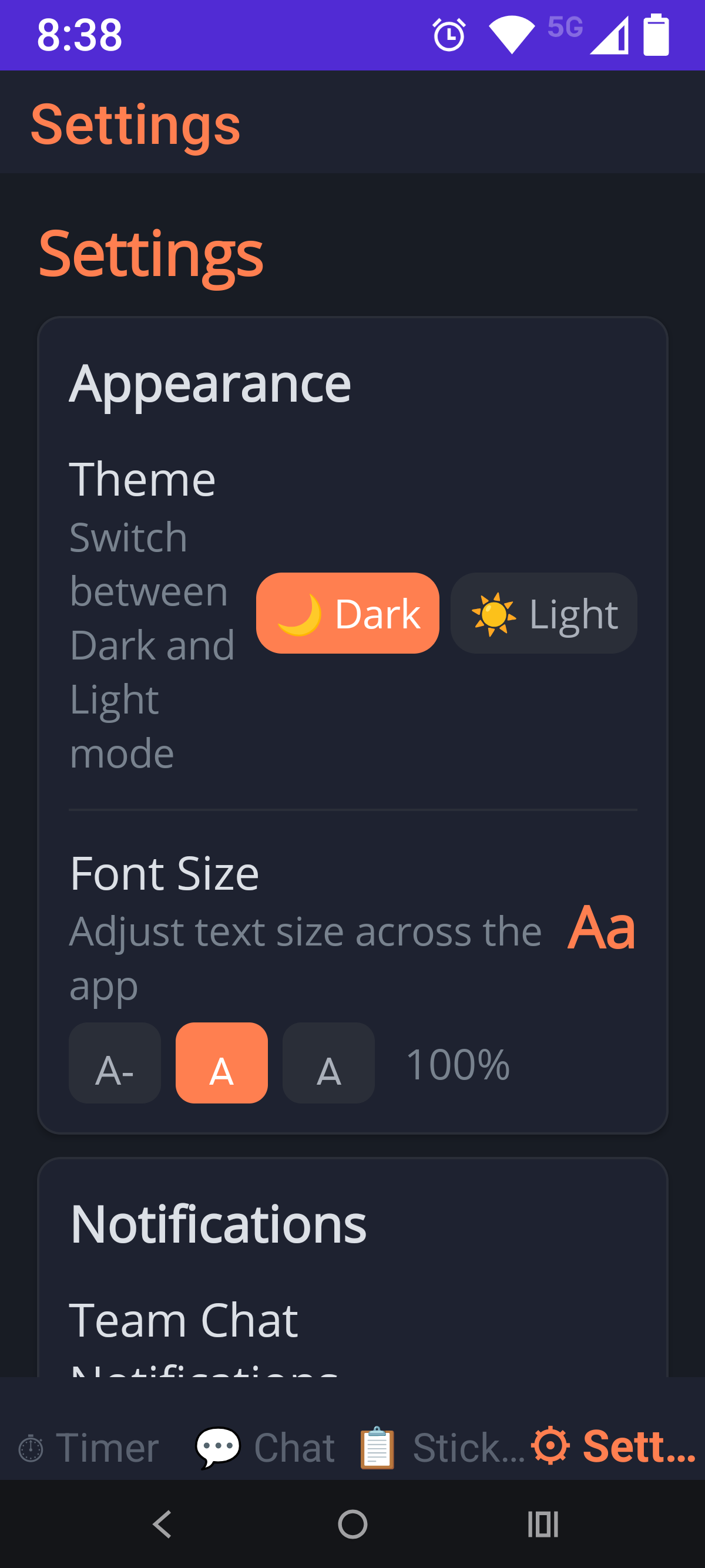
The mobile app mirrors the desktop experience with a beautiful dark theme and full customisation options. Switch between dark and light mode, adjust font sizes for readability, and configure notifications — all from a clean, intuitive interface.
- Dark & Light themes — match your desktop preference or go independent
- Adjustable font size — comfortable reading on any screen
- Push notifications — never miss a team chat message or status change
- Tab navigation — Timer, Chat, Sticker Board, and Settings at your fingertips
The Problem
Small companies and startups face real challenges every single day.
⚠️ What Small Teams Struggle With
- Team members scattered across different time zones — nobody knows who is working when
- Missed tasks and bugs fall through the cracks without a shared board
- Miscommunication between developers, testers, and managers
- No visibility into who is doing what, how long tasks take, or where time goes
- Expensive tools like Jira ($8-16/user/month), Monday.com ($10/user/month), Clockify Pro ($12/user/month) — costs add up fast
- Tool fatigue — switching between Jira, Slack, Google Drive, Clockify, and Notion just to manage a 5-person team
- No budget for enterprise software when you’re a startup trying to survive
✅ How Work Flow Fixes Everything
- Real-time team status — instantly see who is Online, Working, or Offline across all time zones
- Shared task board with priorities and assignments — no more lost bugs or forgotten tasks
- Built-in team chat — communicate instantly without switching apps
- Live time tracking — everyone sees what everyone is working on, with automatic duration logging
- Completely free — $0 per user, $0 per month, $0 forever. MIT license.
- All-in-one — time tracking + chat + task board + file sharing + wiki + reports in a single app
- Your data, your server — Firebase backend you own and control. No vendor lock-in.
The Team
Work Flow is built by a global team of engineers and contributors united by one goal — making team productivity accessible to everyone.
| Name | Role | Contact |
|---|---|---|
| 🇩🇪 Blagoy Georgiev | 🧑🏫 Mentor & Senior Engineer | blagoy@8bitlab.de |
| 🇲🇰 Martin Georgiev | 🎓 Engineer Contributor | martin@8bitlab.de |
| 🇷🇴 Ioana Calescu | 🎓 Engineer Contributor | ioana@8bitlab.de |
| 🇮🇳 Rachul Daeeh | 🛠️ OEM Partner | rachul.daeeh@8bitlab.de |
| 🇲🇰 Nikita Miteski | Software Tester 🧪 | nikita.miteski@8bitlab.de |
How It Works
Get your team up and running in under 10 minutes.
App in Action
Real screenshots from the Work Flow workflow app.
Technical Specifications
| Parameter | Specification |
|---|---|
| Platform | Windows 10+ (x64) — C# / .NET Framework 4.7.2 |
| UI Framework | Windows Forms with custom dark/light theming |
| Backend | Firebase Realtime Database (free tier supports small teams) |
| Authentication | Local SHA-256 hashed passwords — never sent to cloud |
| Real-time Sync | HTTP + Firebase REST API — heartbeat every 60 seconds |
| Reports | iTextSharp PDF generation + CSV export |
| Jira Integration | Optional — auto-log work time to Jira Cloud via REST API |
| License | MIT — free for commercial and non-commercial use |
| Dependencies | Newtonsoft.Json, FirebaseDatabase.net, iTextSharp, System.Reactive |
Open Source Repository
Everything you need is freely available under the MIT licence.
| Item | Details |
|---|---|
| Repository | github.com/8-BitLab/Work-Time-Counter |
| Licence | MIT — free for commercial and non-commercial use |
| Source Code | Full C# source, Designer files, and project configs included |
| User Guide | 22-page PDF included in the repository |
| Community | Issues, pull requests, and forks welcome |
Free for Everyone. Licence Available on Request.
Work Flow is free of charge for any startup, small company, or individual.
Just download, set up, and start tracking.
If your company requires a formal commercial licence agreement for legal or
compliance reasons, simply contact us and we will provide one — free of charge as well.
Have a Suggestion?
Work Flow is a community-driven project. All suggestions, feature requests, and bug reports are welcome. Help us build the best free alternative to Jira and Clockify.
Send your ideas to: martin@8bitlab.de
Open Projects
All our projects are open source, free of charge, and built by our community. No subscriptions. No hidden fees. Just great tools.
SafeStep
BLE Proximity Wander Alert System
Protecting people with dementia — quietly, reliably, openly. A lightweight BLE wristband + USB dongle system that alerts caregivers when a patient wanders out of range. No cloud, no subscriptions, just safety.
| Tech | nRF52840 BLE 5.0, CR2032, Round PCB ≤ 40mm |
| Status | Planning Phase |
| Licence | MIT — Free forever |
Work Flow
You are hereFree Team Productivity & Time Tracking
All-in-one desktop tool for small teams: time tracking, team chat, sticker board, file sharing, wiki, Pomodoro timer, Jira integration, standup generator, and PDF reports. Firebase backend, zero cost.
| Tech | C# WinForms, .NET 4.7.2, Firebase Realtime DB |
| Status | Active — Ready to Use |
| Licence | MIT — Free forever |
A project by
8-Bit Lab Engineering