SafeStep
BLE Proximity Wander Alert System
An open-source BLE proximity alert project for caregivers. Rev B hardware design is complete; firmware development and prototype testing are next.
Open Source
MIT License — free for commercial and non-commercial use. The Rev B hardware package is prepared; firmware development and public release are pending.
Bluetooth Low Energy
Nordic nRF54L15 in a Fanstel BC15M module. The planned wristband-to-receiver link operates locally without a cloud connection.
38 mm PCB
Preserved compact outline with CR2032 power and a fully routed four-layer PCB. Battery life remains to be measured.
Planned USB Receiver
A receiver with audible and visual alerts is part of the intended system. Receiver hardware and firmware require implementation and validation.
PCB & Watch-style Enclosure
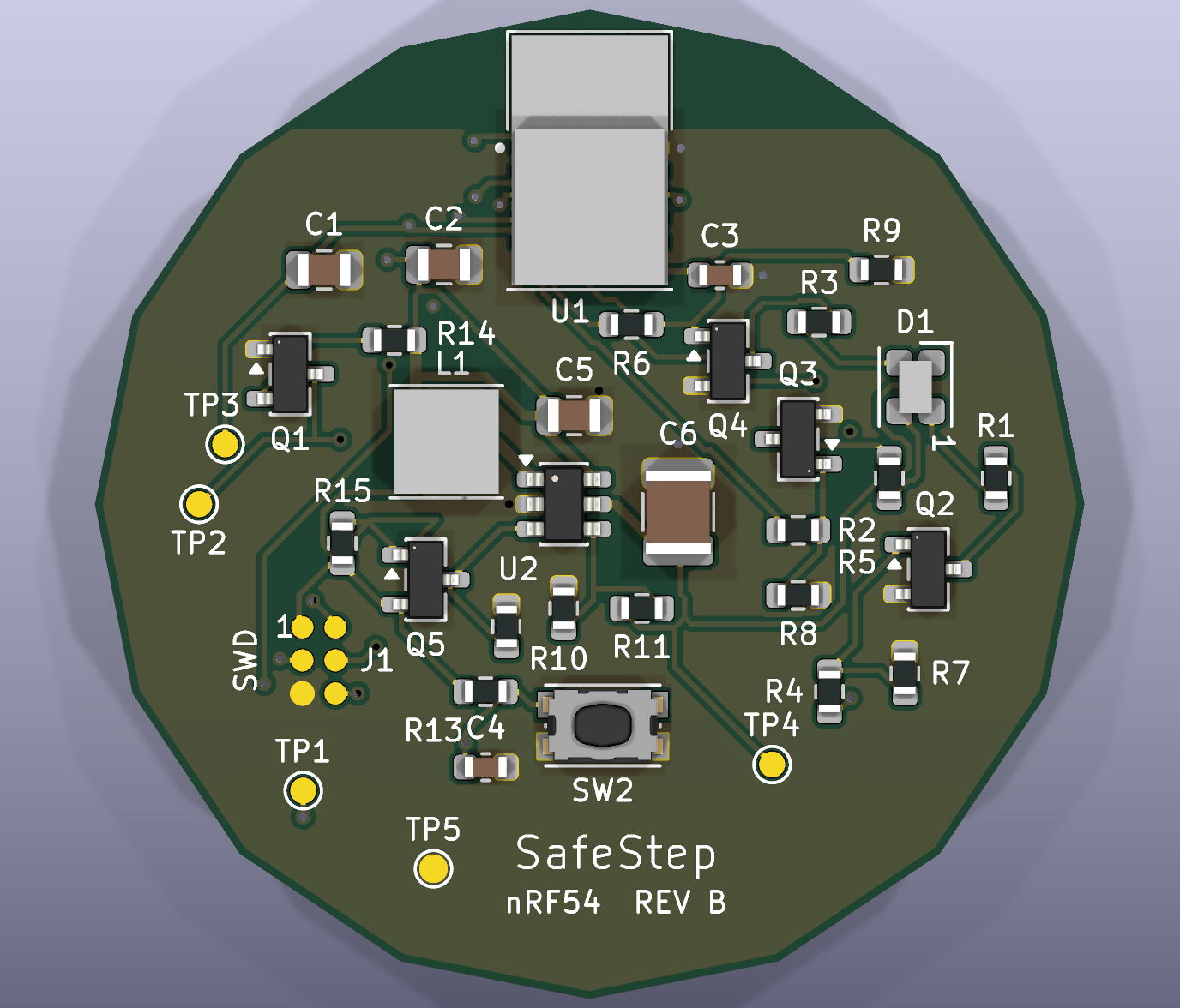
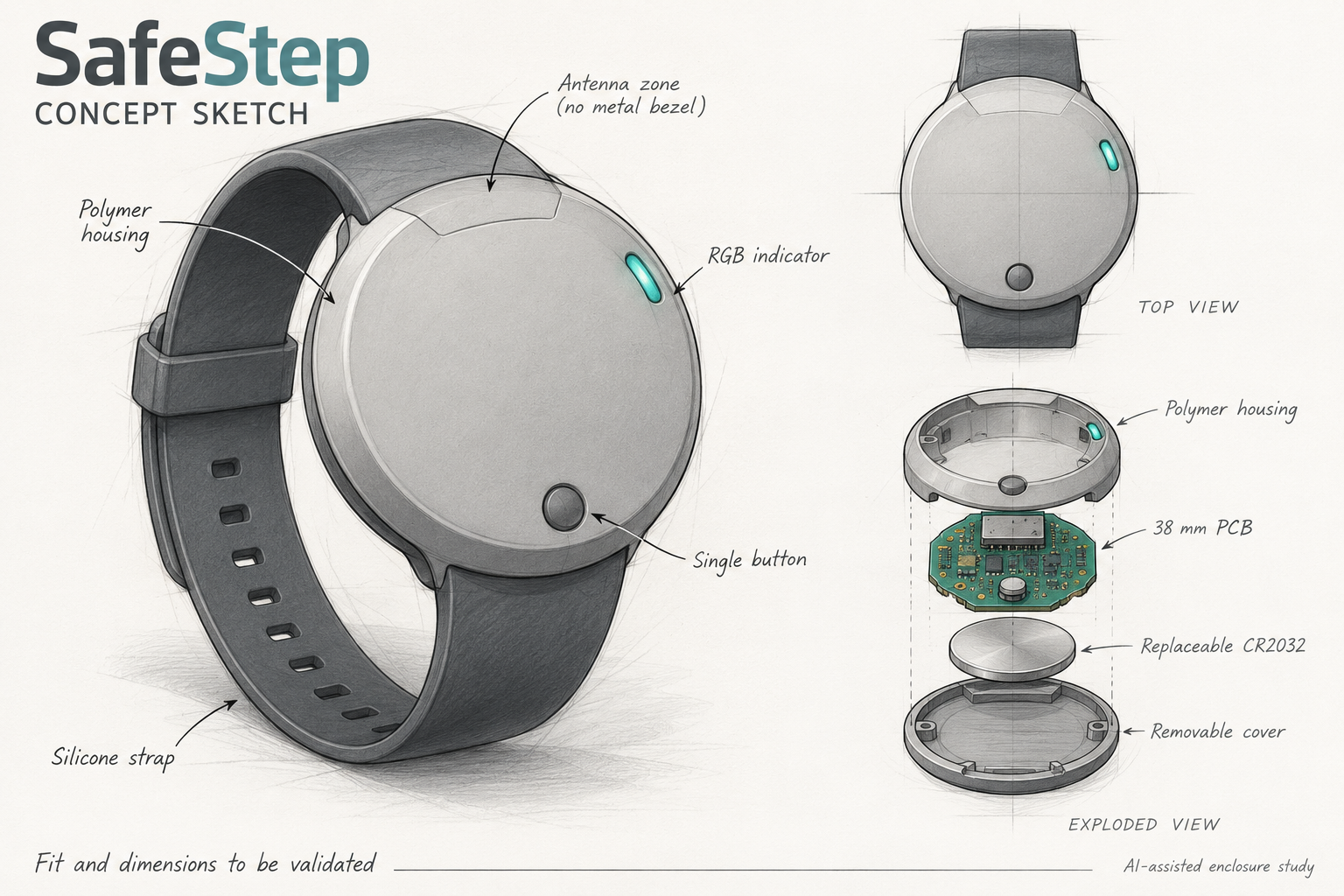
Explore the actual Rev B board and a proposed wrist-worn enclosure. Select either image to see the full-size view.
Rev B PCB CAD RENDER
Watch-style Enclosure CONCEPT SKETCH
The Problem
SafeStep explores a simple, affordable, open-source way to support caregivers when a wearer moves out of range. The goal is a local proximity alert without a smartphone or internet connection. Bluetooth signal strength is affected by walls, body position, and interference, so reliable alert behaviour must be established through testing.
The Solution
SafeStep is designed around two components: a wearable BLE board and a receiver at a caregiver’s PC or dedicated alert station. The planned receiver monitors the radio link and raises an alert when a configured signal or connection-loss condition is met. Rev B covers the wearable hardware; complete system behaviour remains to be implemented and tested.
Planned System Operation
- Activate & Pair — Use the wearable’s button to enter pairing mode; the exact interaction will be defined in firmware.
- Connect — The wearable advertises its BLE identity and pairs with the intended receiver.
- Monitor — The receiver checks connection state and filtered signal strength (RSSI).
- Alert — A sustained threshold or connection-loss condition is intended to trigger an audible and visual alert; timing requires testing.
- Respond — The caregiver checks the wearer’s location and acknowledges the alert.
- Reconnect — Recovery and reconnection behaviour will be validated with the completed firmware.
Rev B Hardware Specifications
| Parameter | Specification |
|---|---|
| MCU | Nordic nRF54L15 in Fanstel BC15M module |
| Wireless | Bluetooth Low Energy — 2.4 GHz |
| Range | To be established by enclosure and on-body testing |
| Battery | CR2032 — 3 V primary, non-rechargeable coin cell |
| Battery Life | Measurement pending; depends on firmware, radio use, and LED duty cycle |
| PCB Outline | 38 mm; original 16-sided outline preserved |
| PCB Layers | 4-layer FR4; nominal 0.8 mm thickness |
| Antenna | Integrated BC15M antenna; all-layer antenna copper keepout |
| Firmware SDK | Nordic nRF Connect SDK / Zephyr planned; development pending |
| Controls & Indication | One button and one RGB LED; original positions preserved |
| Power | Reverse-polarity protection, current-measurement link, switched 4.53 V RGB supply |
| Programming | Six-pad SWD pogo interface with UART and test points |
| License | MIT — free to use, modify, distribute |
Project Status
🔧 Status: Rev B — Engineering Prototype
The Rev B schematic and fully routed PCB are complete, preserving the original battery holder, button, RGB LED, and board outline. KiCad checks report zero ERC errors or warnings, zero DRC issues, no unrouted connections, and no schematic/PCB mismatches. The engineering package includes editable KiCad files, a BOM, manufacturer datasheets, Gerbers, drills, and placement files.
Firmware, assembly, battery performance, optical visibility, and enclosure/on-body radio testing remain to be completed. The retained battery position limits antenna separation, so RF range is not yet established. This is a development prototype; operation in a care setting has not been validated.
Join the Team
SafeStep is built by a global team of engineers and contributors united by one goal — making dementia care safer and more accessible. We welcome further contributors — if you are passionate about embedded systems, PCB design, or BLE firmware and want to contribute to a project that helps people, reach out via our contact page.
| Name | Role | Contact |
|---|---|---|
| 🇺🇸 Mike Midga | 🎓 Project Advisor | mile@8bitlab.de |
| 🇩🇪 Blagoy Georgiev | 🧑🏫 Engineering Mentor | blagoy@8bitlab.de |
| 🇰🇪 Salisu Ali | 🔧 Engineer Contributor | salisu.ali@8bitlab.de |
| 🇲🇰 Nikita Miteski | 🔧 Engineer Contributor | NikitaMiteski@8bitlab.de |
| 🇮🇳 Rahul Daesh | 🔧 Engineer Contributor | daesh@8bitlab.de |
| 🌍 Your Name Here | Engineer Contributor | Apply now → |
Source Files & Documentation
The Rev B hardware package is prepared for engineering review. Public release is pending; contact the team for source-file access. Firmware and validated build instructions will follow development and testing.
| Source Access | Ask about source files |
| Licence | MIT — free for commercial and non-commercial use |
| Hardware | Rev B KiCad schematic and routed four-layer PCB prepared |
| Firmware | nRF54L15 firmware development pending; no validated firmware release yet |
| Docs | Engineering review, BOM, manufacturer datasheets, and prototype manufacturing files prepared |
| Community | Hardware review, firmware development, and prototype-test contributors welcome |
A project by